

Samsung Galaxy Beam
Where reviewers agreed
- Positive: Built-in projector works well · 4 sites
- Positive: Long battery life · 3 sites
- Positive: Attractive, compact design · 2 sites
- Negative: Outdated Android version · 4 sites
- Negative: Expensive for its specs · 4 sites
Points that 2 or more review sites made.
Key specs
Critic consensus

“We found its performance pretty good for the casual media sharing, though the low brightness and the uninspiring resolution hardly make it a great work tool. It's pretty clear that the I8530 Beam was aimed at youngsters rather than professionals and that seems like the more reasonable approach.The projector alone is enough to put the new Galaxy Beam in a niche of its own and it's really hard to compare it to any other devices on the market. So what we need to find instead is how much does the projector cost you and if it's worth it.Samsung is targeting a niche market with the release of the Beam, and as such faces no real competition. That being said, should you buy the Galaxy Beam for its projection capabilities? Given that purchasing a separate projector will be even more expensive than getting the Beam we'd probably say yes. But if you can, you might want to hold off a bit. Odds are the price will fall to more reasonable levels once the Galaxy Beam has been on the market for a few months and you might be able to get a much sweeter deal.”

“Projector aside, the Galaxy Beam works well as a smartphone, without being overly heavy or thick despite the extra load. The camera, processor, and screen behave as expected for a midrange Samsung smartphone, which is to say, perfectly satisfactorily. So if you think you're going to really love using the projector, then the phone stands up as a smartphone all on its own without relying on any extra gadgetry to move it through the door. However, if you're skeptical about how often you'd beam anything anywhere, then you should shop around until you find the exact set of features that gives you what you want most.”

“The phone is a very good all-around Android performer with a fairly compact and appealing design, considering what’s inside. Moreover, the large battery comes in handy to deliver excellent endurance in your daily smartphone routine as well, and there is one extra battery in the box. The only big drawback is that the phone doesn’t come with the newest Android onboard.”

“There's definitely some excitement to be had when reviewing a device so out of the ordinary, but we found it a little difficult to make a final judgment call. The Galaxy Beam does well at what it claims to be good at (projecting media), but it's otherwise mediocre at best. That's not to say it's a horrible phone, but the low-to-mid-range feature set makes it a tough sell at $430, especially when you can pay the same price for much nicer devices these days. In this situation, it means that you either have to love the projector enough to justify the higher price, or the feature is so important to your business that you're willing to sacrifice a lot of modern functionality to get it.The Beam is interesting as a proof of concept, but we don't see it blossoming into anything more than that at the present time. That's not to say this über-specific category doesn't have a future, but something as unique as a projector would likely find more success in a more premium phone: it needs to be incorporated into higher-end devices without making compromises in components, firmware or size. Only then can it be viable as a mainstream device. Until then, it's a fun gadget to show off to friends, but that's the extent of its strengths.”
Watch before you decide


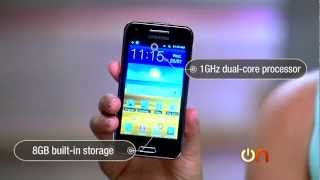


What people actually want to know
When was the Samsung Galaxy Beam released?
The Samsung Galaxy Beam was released on July 2, 2012.
How long does the battery last on the Samsung Galaxy Beam?
The Samsung Galaxy Beam has a 2,000 mAh battery.
Does the Samsung Galaxy Beam have a headphone jack?
Yes, the Samsung Galaxy Beam has a 3.5mm headphone jack.
Where can I get support for the Samsung Galaxy Beam?
Visit Samsung's official support page for warranty info, repairs, and troubleshooting.
Where can I download the Samsung Galaxy Beam manual?
You can view and download the Samsung Galaxy Beam manual on our dedicated manual page.
Questions & answers
✓ Question submitted. We'll notify you when someone answers.
We sent a verification link to . Click it to publish your question.
Can't find it? Check your spam folder.
Finish the security check above to post your question.
Your name shows with your question.
How it compares


New phones, honest scores.
One email when something worth knowing changes. No deal spam, no filler.
i want to know that how cud we zoom in the camera before taking the picture.... ans yes by stretching the image we cud zoom in the taken images...but i want to now how to zoom in the camera before it....?