


Samsung Galaxy S7
Verdict
Key specs
Critic consensus

“The new Galaxy S7 is more of an evolution. Samsung respects the customer's wishes and brings back some features like the memory expansion as well as the IP68 certification for the case against water and dust. The chassis has been reworked as well and is still made of a very sophisticated glass/metal combination, which can compete with the best models on the market. A small surprise is the noticeably thicker chassis, but it hardly affects the handling thanks to the rounded edges. The additional space is used for the larger battery. The SAMOLED panel is even better than before, which convinces with an impressive luminance as well as very accurate colors.”

“Samsung's flagships have always been the trend-setters, and the Galaxy S7 proudly joins its predecessors. Fair enough, after the fundamental overhaul last year, the focus in 2016 is on fine-tuning, polish and refinement. The camera and the Always On display are the couple of attention grabbers but the big story is simple, as usual. The Galaxy S7 is such a complete package that taking a rest on the seventh was obviously never on Samsung's mind.”

“The Samsung Galaxy S7 is a no-compromise luxury phone, and the top of the Android lineup. It's also pretty conventional. There's nothing crazy here like the LG G5's dual cameras or modular build, just a good-looking, powerful smartphone that refines the performance of last year's model. The S7 is also the smallest flagship Android phone out there. It destroys every other Android device in its size class.”

“Getting up to the modern era is mostly good — with a little speed slowdown trade-off. Oreo didn't offer these phones a new lease on life, but it gave them another year of usefulness with no use downside.”
Watch before you decide


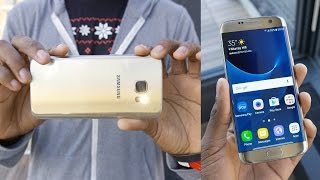


What people say
2 community ratings · Recommendation data coming soon.
Phone randomly mutes calls, phone option sometimes won't work. I had a replacement already and the muting is still happening. I am selling this phone immediately. Stay away.
watch this video- u will get call setting https://www.youtube.com/watch?v=K4JPHNtVNFY
The screen started showing lines and it then stop working at all
In Depth
Fans of Android phones have loved most of Samsung’s Galaxy-series flagships. However, with the minor issues of the S6 and a fresh wave of flagships debuting from the competition, Samsung needed to hit a homerun with the S7 to stay near the top of the pack.
While the phone might look like an S6 on the outside, Samsung has been hard at work tweaking and polishing their favorite flagship. Do the changes add up? We’ve scoured reviews from the biggest tech sites on the Internet to find out! Let’s dig in!
Samsung has stuck with a similar design to their previous Galaxy S6–an aluminum frame with a glass back. However, they have accentuated the curves as the side of the device and massaged bezels and faces to create a sleeker appearance. Most reviews applauded the changes with Android Pit saying it offers a “sumptuously snug fit in the hand” and Stuff declaring, “the whole thing just oozes with quality.”
Trusted Reviews summed up the new design well, stating, “the sides now curve ever so slightly, just like they did on the larger Galaxy Note 5, and it makes a huge change to how the Galaxy S7 feels … It’s marginally thicker than its predecessor and has a nice weight to it. It feels dense and expensive, though not as delicate as you’d expect from a phone with glass on the front and back. I dropped it about four foot onto a hard floor and it survived without any problems.”
Overall, reviews indicate that Samsung has found a great balance between design, size and comfort. Unfortunately, that shiny glass that provides a nice appearance has one downside. Alphr notes, “This is a phone you’ll be wiping on your shirt to keep clean – a lot.”
Heading around to the front of the handset, you’ll find the first difference between the S7 and S7 Edge. The S7 features a 5.1-inch Super AMOLED display while the Edge goes slightly bigger at 5.5-inches. Both feature a quadHD resolution of 2560-by-1440 pixels resulting in some of the highest pixel densities available in a mobile phone. There’s also the Gorilla Glass 4 treatment to help repel scratches and glare.
Reviews on the display are great across the board. Android Pit declared, “The screen is typical Samsung: that is to say, it’s sublime.“ Stuff took the S7 for a spin and says it “delivers an incredible amount of clarity and detail. Text is pin-sharp whether you’re browsing this wonderful website, or other lesser alternatives, and video ain’t half bad either.”
Another perk to the Super AMOLED technology is the always-on display feature new to the S7. This allows the phone to display basic notifications and other widget-style information on the display even when the phone is resting on your desk. Samsung notes that battery usage should be minimal (1% of your battery per hour) and most reviews agree.
However, most reviews noted that notifications are limited to Samsung specific apps. Alphr noted, “Having lived with the S7 for a while now, though, I’m not convinced of its usefulness.“ If you’re hoping for GMail or WhatsApp notifications, you might be disappointed unless Samsung rolls out an update.
To push all those pixels, Samsung opted for an octa-core processor. The global variant uses the Exynos 8890 processor while the US model sports a Snapdragon 820. If you’re worried about which to grab, TechRadar notes, “The differences between the two variants (global vs North America) may frustrate mentally, but you won’t see any differences day to day, so don’t fret.”
This is due to the sheer power offered by both processors. Most reviews note that the phone features enough processing power to keep any user happy well into the future. Trusted Reviews states, “for the time being Samsung’s latest flagship is the one to beat.” Android Pit ran a full series of benchmarks and declared, “in many measurements, the Galaxy S7 is faster than every other Android devices we’ve seen in the newsroom.”
The responsiveness of the S7 is partially thanks to its generous 4GB of RAM. This provides enough memory for virtually any app and reviews indicate that even heavy multi-tasking is silky smooth. Upgrades to the 32GB of internal storage also squeak out more performance while loading large files or turning the device on or off.
Should you need more space, Samsung has brought back microSD support for cards up to 200GB in size. However, reviews noted that the recent Android Marshmallow feature to merge microSD and internal storage was not activated on their handsets.
Another feature returning from previous handsets is the IP68 water-resistance rating. Unlike the plastic flaps and covers of the S5, the S7 accomplishes this through its design providing less chance of error and greater protection. Reviews indicated that the S7 shrugged off everything from a splash to a 10-minute drop in the pool.
The second difference between the S7 and S7 Edge is in the battery. While both are non-removable, the Edge offers slightly more battery capacity, coming it at 3600mAh compared to the 3000mAh of the S7. Both phones support wireless PMA and Qi charging and offer fast charging modes for quick top offs while you go about your day.
Reviews indicate both batteries require approximately 90 minutes for a full charge while a quick 10 minute boost will net you a few hours of usage when needed. PC Advisor UK put the phone through its paces and said, “With heavy usage of course your results will vary, but with light-to-moderate use we could easily see this battery lasting two days.”
If you’re looking to snap pictures or record HD video with your phone, the 12-megapixel Dual Pixel camera with optical image stabilization on the phone receives high marks, rivaling those of the acclaimed iPhone 6s. Fans of selfies? A 5-megapixel wide-angle lens on the front offers enough room in the frame for you and a few friends.
Reviewers were excited to try the new camera as it’s one of the few mobile phones featuring dual-pixel technology–a feature typically reserved for high-end DSLR cameras. Reviews were undoubtedly positive. Gizmag applauded the camera for its “outstanding low-light camera performance.” Trusted Reviews says the S7 features the “best autofocus I’ve ever used on a phone.” Stuff Magazine tried out the camera and said, “the S7 captures the kind of pictures you can post to Instagram with an obnoxious but proud #nofilter.”
There were a few areas where reviewers were undecided or unimpressed. One of the biggest being Samsung’s decision to still use TouchWiz with Android 6.0.1. Reviews noted that while the interface is much better than previous editions, it still feels cluttered compared to the stock Android interface. There’s also the fact that many reviewers found that the pre-installed software on the phone took up more than 7GB of storage space–much of which cannot be uninstalled.
Another issue many reviewers had was with the speaker on the phone. By opting to place the speaker on the bottom of the phone, many reviewers noted that they often muffled the sound with their hand. PC Advisor UK did more in-depth testing and found, “When testing the phone’s internal audio quality we found the S7 to be mediocre in its ability to drive an audio signal when tested at 80-85 percent of the maximum volume. By comparison, the Samsung Galaxy S6 needed only 55-60 percent of its total volume to output the same sound.“
Lastly, many reviews noted a slight delay in the performance of the phone’s fingerprint sensor. While no review considered the fingerprint scanner a glaring problem, nearly all noted that it wasn’t quite as responsive as the scanners on other flagships.
Overall, reviews for the S7 are undeniably good. Trusted Reviews praised it as “the most complete phone I’ve ever used.” Android Pit ends their review stating, “The Galaxy S7 surely warrants its asking price. It excels in all the key areas: its camera is the best that we have tested so far; its gaming performance is great and future-proof; its battery life is enough to support heavy use; and it’s generally a snappy and smooth device.”
Perhaps the best summary of the new flagship duo comes from Stuff, saying, “Where past Galaxy S handsets have felt like a checklist of enviable specs, this device is a complete all-rounder. More than offering you a tremendous processor or bumper battery, the S7 focuses on how these components tally together and whether you’re going to enjoy using them.”
What people actually want to know
When was the Samsung Galaxy S7 released?
The Samsung Galaxy S7 was released on March 11, 2016.
How long does the battery last on the Samsung Galaxy S7?
The Samsung Galaxy S7 has a 3,000 mAh battery.
Is the Samsung Galaxy S7 water resistant?
The Samsung Galaxy S7 carries an IP68 rating.
Note: water resistance degrades over time and manufacturer warranties typically don't cover liquid damage.
Does the Samsung Galaxy S7 support wireless charging?
Yes, the Samsung Galaxy S7 supports wireless charging.
Does the Samsung Galaxy S7 have a headphone jack?
Yes, the Samsung Galaxy S7 has a 3.5mm headphone jack.
Does the Samsung Galaxy S7 support 5G?
Yes, the Samsung Galaxy S7 supports 5G connectivity.
Does the Samsung Galaxy S7 have NFC?
Yes, the Samsung Galaxy S7 has NFC. You can use Google Wallet, Apple Pay, and tap-to-pair with Bluetooth accessories.
Where can I get support for the Samsung Galaxy S7?
Visit Samsung's official support page for warranty info, repairs, and troubleshooting.
Where can I download the Samsung Galaxy S7 manual?
You can view and download the Samsung Galaxy S7 manual on our dedicated manual page.
Questions & answers
Loading answers…
Loading answers…
✓ Question submitted. We'll notify you when someone answers.
We sent a verification link to . Click it to publish your question.
Can't find it? Check your spam folder.
Finish the security check above to post your question.
Your name shows with your question.
How it compares


New phones, honest scores.
One email when something worth knowing changes. No deal spam, no filler.
Hello I have the same issue and my phone too was in water. Prior to I had no issues getting notifications of texts, but after the water nothing comes through.However, I receive all other notifications with no issues at all. I wonder if the water is what caused the issue. Can anyone else help or verify if this is the cause?