

Motorola Moto E (2nd Gen)
Verdict
Key specs
Critic consensus

“The Motorola Moto E stands as a litmus test for the ultra-budget smartphone market. The high-quality parts and clean Android software make for a potent combination, especially in the sub-$100 realm.”

“The build and the choice of materials are very good, and would also look good in even considerably more expensive smartphones. The plain and stylish design also appealed to us. The internal 8 GB storage is easy to expand for little money via a micro-SD card. Furthermore, the hardware's performance alongside the latest Android 5.0.5 operating system and long battery life is convincing. The communication modules do not exhibit any major missteps, and LTE is still the exception in this price range. That makes it easy to forgive the lack of NFC. Our verdict about the 4.5-inch screen is mixed. The IPS screen's high contrast and great black level reap in a good score, and the color reproduction is also decent. On the other hand, the low brightness is not as pleasing and makes outdoor use a bit difficult. However, the camera modules and the squeaky speaker are really disappointing.”
“With the addition of LTE and a processor upgrade,Motorola's latest Moto E narrows the gap between entry-level and high-end smartphones.”

“The $150 version of the new Moto E does a lot of things very well, especially for the price. Performance is generally good. The LTE speeds are as good as what you'll get in many high-end phones. Build quality is fine and screen quality is good even if its resolution and pixel density aren't very impressive. You cut corners to get here—the camera, the storage, and NFC for mobile payments are probably the most noticeable, in that order—but this new Moto E does a better job of covering the basics than the old one did.The phones that come the closest to matching the Moto E's bang-for-buck are Microsoft's Lumia phones, and new additions like the 640 are particularly attractive. However, the fact remains that the Android software ecosystem is larger and more varied, and an Android phone will serve a general smartphone buyer better in the long run.If you're dead-set on spending less than $200 on an unlocked phone, we might actually recommend the new Moto E over the second-generation Moto G in some cases. The Moto E has the faster processor and better cellular connectivity, it's got superior battery life, and it has a 4.5-inch screen that might appeal to fans of smaller phones. If those are the most important things about a phone for you, get the $150 Moto E.If you prefer a higher-resolution screen, a phone that's physically larger, or a slightly better camera, the $180 Moto G is the better pick. It's not as fast, but it's not so much slower that you'll end up hating it. It's too bad that Motorola didn't do more to upgrade it when it came out, but in the smartphone business the next refresh is only ever a few months away.With this release, however, we would recommend that you stay away from the old Moto E, which cuts too many corners, and the $130 3G version of the new Moto E. You give up too many things to save that $20. Generally speaking, we'd favor the LTE Moto E over the first-generation Moto G unless you can find it at a pretty deep discount.Motorola is still making the best budget Android handsets you can get for the money. Lenovo hasn't screwed that up yet, and hopefully the company doesn't try to fix what isn't broken.”
Watch before you decide




In Depth
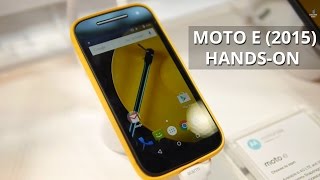
Motorola follows up the success of their budget Moto E phone with an updated 2015 model. While it won’t win any awards for best-looking smartphone, the 2015 Moto E did give experts the impression of “affordable but sturdy.” It comes with an all-plastic build and interchangeable band wrapping around the rim, which hides the microSD and SIM slots. Users can customize their phone by choosing different band colors. Besides the aesthetic quality of the bands, experts add that it along with the matte back finish helped improved overall grip on the otherwise round phone. It’s also a bit on the thick side at 0.5 inches but critics add that it didn’t detract from its usability at all.
At 4.5 inches, the display on the 2015 Moto E is 0.2 inches larger than its predecessor though it does stick with the same 540p resolution. That means its pixel density is slight lower at 245ppi. While it wasn’t generally an issue with critics they did notice some fuzziness and lack of fine detail on text and images. With that said they add that the quality of the display helped soften the blow as it provided them with good viewing angles, excellent brightness and vibrant colors. Androidpit adds that it is, “…perfectly sufficient for the casual user.”
Another upgrade on the 2015 Moto E is its internal specs. It now comes with 1.2GHz quad-core processor and 1GB of RAM. While it is provided better performance than the older Moto E and Moto G, experts still warn that it is not a gaming powerhouse. Even on simpler games they experience some hiccups and, with 3D games, very noticeable lag. Still, they were able to perform more basic tasks with ease. It also comes with a mere 8GB of internal storage though it does have a microSD slot. In order to counter the more powerful processor, Motorola stuck a 2,390mAh battery in the second generation Moto E. In general, experts were able to get a full day’s of use during moderate usage, but when 4G LTE is used the batteries drain fairly fast and last only 8-9 hours.
Perhaps the biggest letdown of the new Moto E is its camera. It keeps the same 5MP resolution and lack of LED flash though it replaced the fixed focus lens with an auto-focus one. That said, many experts didn’t see too much of an improvement in picture quality. Images still lacked definition and detail even under optimal light conditions and, they add, colors looked artificial. When compared to the original Moto E, Ars Technica notes that it “…is a small improvement.”
While there are some downsides to the Moto E (2015), reviewers still have no problem recommending it to the casual Android user. Pocket Lint states, “…the Moto E is brilliant for the price…for the money, there’s arguably no better budget phone on the market.”
What people actually want to know
When was the Motorola Moto E (2nd Gen) released?
The Motorola Moto E (2nd Gen) was released on February 25, 2015.
How long does the battery last on the Motorola Moto E (2nd Gen)?
The Motorola Moto E (2nd Gen) has a 2,390 mAh battery.
Does the Motorola Moto E (2nd Gen) have a headphone jack?
Yes, the Motorola Moto E (2nd Gen) has a 3.5mm headphone jack.
Does the Motorola Moto E (2nd Gen) have NFC?
No, the Motorola Moto E (2nd Gen) does not have NFC. Contactless payments and tap-to-pair will not be available.
Where can I get support for the Motorola Moto E (2nd Gen)?
Visit Motorola's official support page for warranty info, repairs, and troubleshooting.
Where can I download the Motorola Moto E (2nd Gen) manual?
You can view and download the Motorola Moto E (2nd Gen) manual on our dedicated manual page.
Questions & answers
Loading answers…
Loading answers…
✓ Question submitted. We'll notify you when someone answers.
We sent a verification link to . Click it to publish your question.
Can't find it? Check your spam folder.
Finish the security check above to post your question.
Your name shows with your question.
How it compares


New phones, honest scores.
One email when something worth knowing changes. No deal spam, no filler.
I've fixed it! It's very complicated, but here's a step by step rundown: 1. Turn it off if it's not already off. 2. Press and hold the power button and volume down buttons simultaneously. 3. When confronted with a strange screen, select recovery mode with the volume buttons, and execute with the power button. 4. Now select factory reset (yes, so you better have all your stuff safe) and confirm. 5. Then after the factory wipe finishes, boot normally. 6. Set up as if the phone is new and voilà ! No more problems. ð