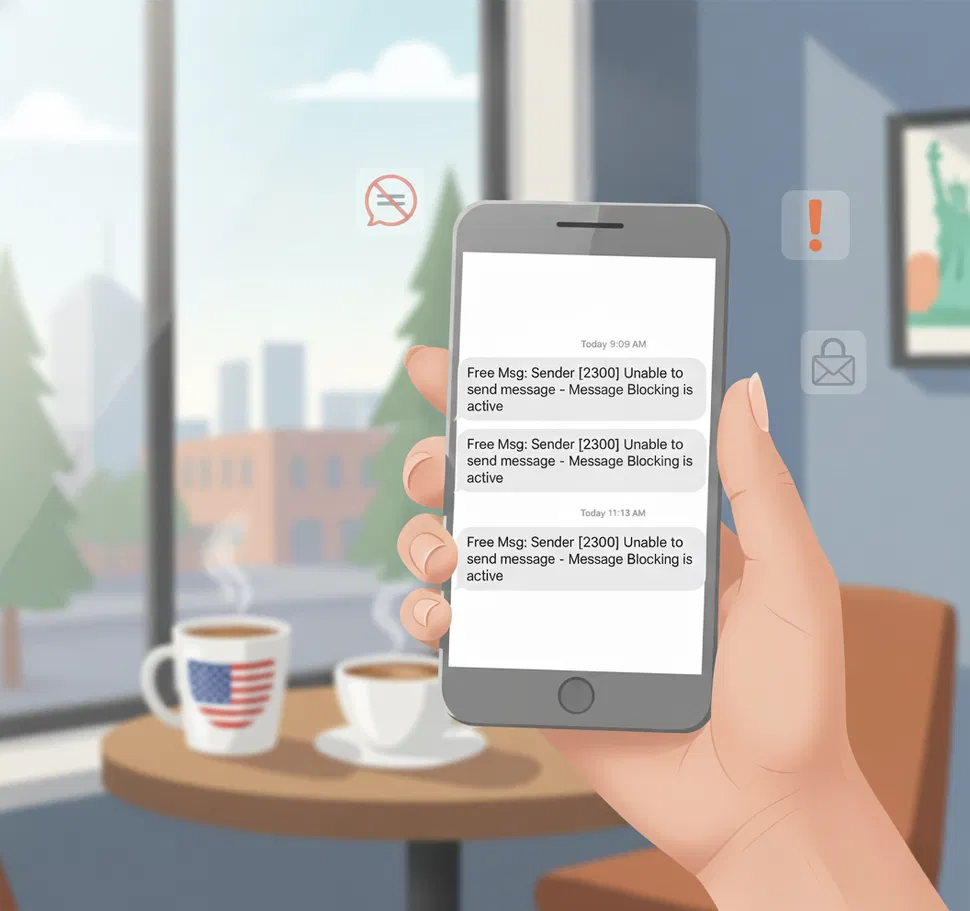
If you’re receiving text messages from short numbers like 2300, 7726, or 2220, these are not scams, not personal messages, and not signs your phone has been hacked.
These are automated system alerts from your wireless carrier (Rogers, Bell, Telus, etc.).
They appear when:
- A blocked number tries to text you
- Spam is being reported
- Your voicemail or messaging system needs to sync
- Your account has a billing or service notification
They are normal, and in most cases, they simply indicate that your carrier’s filters and notification systems are doing their job.
What Each Code Means
| Code | Meaning | Why It Happens | What to Do |
|---|---|---|---|
| 2300 | Message Blocking Is Active | A number you’ve blocked is still trying to contact you, or messaging settings are preventing delivery | Check your block list and messaging settings (see below) |
| 7726 | Spam Reporting Shortcode (“SPAM”) | When you forward unwanted texts to report them | Only use this to report real spam; replying is safe and free |
| 2220 / 2222 | Account or Billing Notifications | Plan changes, billing reminders, voicemail sync notifications | Log in to your carrier account to confirm the notice is expected |
Important: These codes are not used by brands or marketing campaigns. They are carrier-only system codes.
Most Common Reason You’re Seeing These
A Blocked Number Is Still Trying to Reach You
If you blocked someone on your phone (whether in your Contacts or via your carrier), and they text you again, your carrier sends you a 2300 notification letting you know the message was blocked.
Blocking someone on Facebook or Instagram does not trigger this. This only happens when the number is blocked on your phone or your carrier account.
Other Causes to Be Aware Of
1. Visual Voicemail Sync Issues (Very Common)
Carriers use shortcodes to manage voicemail syncing. If Visual Voicemail is misconfigured, you may repeatedly see 2300 or 2220 alerts.
Fix (simple reset):
- Turn Visual Voicemail off
- Restart your phone
- Turn Visual Voicemail back on
If you use a third-party voicemail app, switch temporarily to your carrier’s default voicemail app to test.
2. Spam Filtering or Call-Blocking Apps
Apps like:
- TrueCaller
- Nomorobo
- Hiya
- Whoscall
may block legitimate carrier shortcodes by accident.
Test by temporarily disabling spam protection:
iPhone: Settings → Messages → Filter Unknown Senders → turn OFF
Android (Google Messages): Messages → Settings → Spam Protection → turn OFF
If the messages stop, one of these apps was interfering.
3. Carrier Account or Plan Restrictions
These messages can also appear if:
- SMS is disabled on your plan
- Your bill is past due
- Family/parental controls block shortcodes
Check your account based on your carrier:
Rogers: rogers.com → Account → Messaging Settings
Bell: bell.ca → My Account → Profile → Privacy & Security
Telus: telus.com → My Account → Line Settings → Messaging
If anything is unclear, contact support and ask:
“Can you check if shortcode messaging is restricted on my line?”
Quick Fix Checklist
Try these in order:
- Check your Block List
- Temporarily disable spam/unknown sender filters
- Reset Visual Voicemail
- Verify your carrier account has SMS + shortcodes enabled
- Restart your phone
Most issues resolve by step 3.
Should You Block These Shortcodes?
No.
Blocking them hides useful system alerts and often causes more confusion later.
Key Takeaway
Messages from 2300, 7726, 2220, or similar shortcodes are:
- Normal carrier notifications
- Not hacks or personal messages
- Not scams
They usually mean:
- A blocked number tried contacting you
- Your voicemail needs to sync
- A spam report was processed
- Your carrier is sending an account notification
Understanding the cause helps you stop unwanted repeats without disabling important system alerts.
Common Questions
How do I report spam using 7726?
7726 (which spells “SPAM” on a phone keypad) is a universal shortcode used across all Canadian carriers for reporting unwanted text messages. To report spam:
Forward the unwanted text message to 7726
You’ll receive a prompt asking for the sender’s phone number or shortcode
Reply with the sender’s number (copy it from the original message and paste it into the reply)
Send the reply
Your carrier receives the report, and if multiple users report the same number, the carrier can block it at the network level. Reporting to 7726 is free and doesn’t count against your messaging or data plan in Canada.
Should I block shortcodes like 2300 or 7726 to stop seeing them?
No. Don’t block carrier notification codes. Blocking 2300 prevents you from seeing important delivery notifications. Blocking 7726 prevents you from reporting spam. These codes are part of your carrier’s system for your benefit — blocking them removes helpful network information.
If you’re receiving repeated unwanted messages from shortcodes, the issue is an underlying block misconfiguration or app interference (see the troubleshooting steps above), not something solved by blocking the codes themselves.
Why aren’t I receiving 2FA codes from my US bank or credit card company?
Canadian carriers like Bell and Rogers restrict messages from US-origin shortcodes as part of CWTA compliance requirements. This can prevent you from receiving two-factor authentication (2FA) codes from US-based financial institutions or services.
Workarounds:
Contact your bank or service provider and request they send 2FA codes via email instead of SMS
Use an authenticator app (like Google Authenticator or Authy) if available
Consider setting up a Google Voice number as a backup contact method for 2FA
Contact your Canadian carrier to discuss possible exceptions (some may accommodate specific requests)
This is a known limitation in Canada, not a security issue with your account.
What if none of these troubleshooting steps work?
Contact your carrier’s support team with:
The exact shortcode (e.g., 2300)
The complete message text you’re receiving
How frequently you’re receiving them
Whether you’ve noticed a pattern (e.g., always after a specific time, always after attempting to text someone)
Carrier support can access your account-level settings and filtering rules that aren’t visible to you. They can identify misconfigured blocks, reset filtering rules, or diagnose service issues.