Skip to content
Home…›Nokia
Manual
Nokia Released Jun 2014 Discontinued

Nokia 225

Custom Nokia OS Series 30 Operating system
2.8" Screen size
2MP Main camera
— Processor
2 MB Storage
1,200 mAh Battery
By category

Key specs

Video reviews

Watch before you decide

Reviews
Nokia 225 Flashing And Security code Reset Tutorial Without box
Tuts For You
Nokia 225 (Full Detail) Charger Fault Solutions By Maximum Technology
MAXIMUM TECHNOLOGY
Nokia 225 keypad not working solution
raja thirupathi
Struggling With Nokia 225 Back Cover
vPDeos
How To Flash Nokia 225 RM-1011 By infinity-Best
Joker Soft
Nokia 225 Secret Codes
Penumatsa Rangaraju
Nokia 225 RM 1011 Reset Factory Default FlashTool
Galeri Video
Nokia 225 Mobile Multitasking Test. Call Record,Sms While Calling
5G
Nokia 225 Dual Sim Mobile Unboxing Video Quick View
5G
Nokia 225 factory reset or format
ELiin Di
NOKIA 225 BLACK FIRST LOOK AND UNBOXING BANGLA REVIEW
Nurul IslaM
Nokia 225 factory reset
GSM-ABC
Nokia 225 Dual Sim Mobile Phone Cell Phone Review, New Nokia 2014.
SJP
Nokia 225 Unboxing/Review, Camera/Facebook/32Gb/NFC at Just $50 !!
S.K. Bhardwaj
Specifications
Full specs
Overview
Released Jun 2014
Announced —
Price tier —
Also Known As —
Processor —
CPU Speed —
RAM —
Storage 2 MB
Price (CAD) —
Regions USA, Canada
Regional Variants —
Warranty 1 Year
Accessories AC Charger, Manual, Standard Battery, Headset
Software & Support
OS Custom
OS at Launch Nokia OS Series 30
Current Version —
OS Updates —
Security Updates —
Custom UI —
Display
Type Color
Technology LCD (TFT)
Size 2.8"
Resolution 240 × 320
Pixel Density 142 ppi
Colors 262k
Refresh Rate —
Touch Sampling Rate —
Peak Brightness —
Always On Display
DC Dimming
DisplayMate Grade —
Multi-touch
Fingerprint Resistant
Sensors —
Additional Features -
Secondary Display
Secondary Display
Type —
Size —
Resolution —
Color Type —
Colors —
Camera — Main
Main Camera 2MP
Flash No
Sensor Name —
Sensor Size —
Focal Length (Main) —
Focal Length (Ultrawide) —
Focal Length (Telephoto) —
Optical Zoom —
Digital Zoom 2
Video Resolution QVGA (320 x 240 pixels)
Video FPS 15fps
Video Length —
Video Formats 3GP / 3GPP
Features Night mode, Self-timer
Additional Info Scene modes
Camera — Front
Front Camera
Video Recording
Resolution —
Video Resolution —
Video FPS —
Zoom Unknown
Optical Zoom —
Digital Zoom —
Features —
Additional Info -
Camera — Scores
DxOMark Overall —
DxOMark Photo —
DxOMark Video —
DxOMark Zoom —
DxOMark Bokeh —
DxOMark Selfie —
DxOMark Rank —
Performance
Chip —
Process Node —
GPU —
RAM —
Storage 2 MB
AnTuTu v11 —
Geekbench 6 Single —
Geekbench 6 Multi —
Geekbench 5 Single —
Geekbench 5 Multi —
Battery
Capacity 1,200 mAh
Type Lithium-Ion (Li-Ion)
Removable
Fast Charging —
Wireless Charging —
Comes with Charger —
Talk Time 21h 00m
Video Playback 13h 30m
Internet (WiFi) —
Internet (Cellular) —
Standby 36h 00m
Mixed Usage —
Charge Time 0–100% —
Charged in 30 Min —
GSMArena Score —
Battery Test Source —
Battery Life (Call) —
Battery Life (Video) —
Battery Life (Web) —
Battery Life (Gaming) —
Connectivity
Wi-Fi —
WiFi Version —
Bluetooth 3.0
Bluetooth Profiles OPP/FTP
Bluetooth Codecs SBC
USB Type Micro-USB 2.0
USB OTG
USB Speed —
NFC
Infrared
Headset Jack 3.5mm
Mobile Hotspot
GPS
GPS Type —
UWB
Satellite —
Memory Expansion
Expansion Type MicroSD, MicroSDHC
Expansion Capacity 32MB
Cellular
Networks GPRS, EGPRS
2G MHz
900 1800
Data —
VoLTE Unknown
WiFi Calling Unknown
Physical SIM Mini-SIM
Dual SIM
eSIM
Push to Talk
Data Tethering
Design & Build
Form Factor Bar
Material Plastic
Frame Material —
Rear Material —
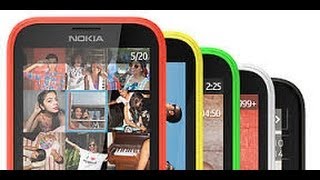
Colors Red, Yellow, White, Black, Green
Dimensions 12.4 × 5.5 × 1 cm (4.88 × 2.17 × 0.39 in)
Weight 100g
IP Rating —
Water Resistance Unknown
Fingerprint Sensor No
Rugged Design
iFixit Score —
Parts Availability —
Audio
External Speakers Yes
Noise Cancellation
Dolby Atmos
Hi-Res Audio
FM Radio —
GSMArena Loudness —
Speaker Loudness —
Input & Navigation
Touchscreen
Navigation Type D-pad
Keyboard Type Standard / 12-key Numeric
Home Key
Sleep/Wake Key
External Volume
Safety
SAR Head 1.05 W/kg
SAR Body 0.78 W/kg
Hearing Aid Compatible
TTY/TDD
More
Additional Information —
Additional Comments

Also available in a dual-SIM model.
Built-in Flashlight.

Related Links Official Website
Manual Download PDF
Quick Start Guide —

Specifications are sourced from manufacturers and third-party databases and may contain errors. Suggest a correction →

Common questions

What people actually want to know

When was the Nokia 225 released?
How long does the battery last on the Nokia 225?
Does the Nokia 225 support wireless charging?
Does the Nokia 225 have a headphone jack?
Does the Nokia 225 have NFC?
Where can I download the Nokia 225 manual?
Community

Questions & answers

JI
Jim Y · Answered

While the answer to shut off the auto setting helped a bit it still left me frustrated. My new Nokia 225 4G displays the date format as Day-Month-Year I can not locate an option to change to the format that is used in the US, Month-Day-Year! Any help detailing how to do this would be appreciated. Thanks

FL
Flavius Q Zook · Answered

I have a Nokia 225 and when I go to Settings (the cog icon), I see no option called Date & Time Settings nor do I see an Automatic Date & Time setting. Can someone tell me how I reset the date and time on my phone because I have searched high and low through the phone and the manual and see absolutely no way to do this. Could you please tell me in a very step-by-step way, so the instructions are very clear? Thanks so much in advance for your trouble! :)

You
GR
Grindale · Answered

I owned a similar Nokia phone before and it did not have any option to display name and number in contacts menu.

You
GR
Grindale · Answered

The Nokia 225 does not have Wi-Fi connectivity. You can only connect to the internet by using data.

You
AR
arn · Answered

This is the correct answer for getting images from your SD card, NOT from the phone memory itself. I don't know how you are supposed to retrieve the images from the internal memory of the phone. (this will be a small amount of images due to the limitations of usable internal memory, and is only used if there is no SD card in the phone, often it is those first five images you took when you got the phone!).&nbsp, The only practical way I could find to retrieve these images was by using SHARE from the photo gallery menu, (in the phone), and then selecting Bluetooth Slam to send them to another device, (a smart phone or other PC friendly device).In answer to the comment:To select Mass Storage you look at the phone screen, it is on the phone you must select mass storage, not on your computer monitor.

GR
Grindale · Answered

Copy photos, videos, music, and other content created by you (and stored on the memory card) between your phone and computer. To copy content from the phone memory, you need to have a memory card inserted in your phone. 1. Connect your phone to a compatible computer with a compatible USB cable. 2. Select Mass storage. 3. On your computer, open a file manager, such as Windows Explorer, and browse to your phone. You can see the content stored on the memory card. 4. Drag and drop items between your phone and computer. Got this info from the manual. If you don't have one yet, you can download a copy from the Nokia 225 page.

You
WI
will.p615 · Answered

My Phone is having a similar problem. It goes through the opening jingle, but halfway through the last note, it shuts off entirely. How to fix?

You
PE
pete_13005 · Answered

My Nokia 225 will not send messages from Cyprus to England and I am with o2 and it automatically charges 1.99p day why

You
LA
Lauren C · Answered

I tried this and it just comes up with the error message 'Incoming calls will be forwarded'

You
IM
imran · Answered

How Much Message memory in NOKia 225 and how to chek it??>>>???>>??>>??> and change the Message save location??

MA
mazharishtiaq · Answered

Can I save messages in Nokia 225 to micro SD card instead of phone memory? I am getting memory full, delete some messages

You
VA
Vasilis · Answered

Me again ...I found this site and i think it may be useful ---> https://nokiapoweruser.com/how-to-import-contacts-on-nokia-215-220-225-230/

You
CA
Carl · Answered

You can't connect Nokia 225 to a car because it doesn't support the Bluetooth profile to be able to connect to a car.To turn off voicemail, please contact your carrier to disable this service.

You
Have a question?
Nokia
Made by
Nokia
746
Phones reviewed
Cellphones.ca Newsletter

New phones, honest scores.

One email when something worth knowing changes. No deal spam, no filler.

By subscribing you agree to receive emails from Cellphones.ca. Unsubscribe anytime.

Compare is full