

Karbonn Titanium Wind W4
Key specs
Watch before you decide


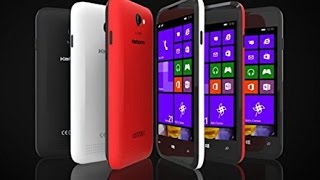
Overview
Software & Support
Display
Secondary Display
Camera — Main
Camera — Front
Camera — Scores
Performance
Battery
Connectivity
Cellular
Design & Build
Audio
Input & Navigation
Safety
More
Specifications are sourced from manufacturers and third-party databases and may contain errors. Suggest a correction →
What people actually want to know
When was the Karbonn Titanium Wind W4 released?
The Karbonn Titanium Wind W4 was released on September 25, 2014.
How long does the battery last on the Karbonn Titanium Wind W4?
The Karbonn Titanium Wind W4 has a 1,950 mAh battery.
Does the Karbonn Titanium Wind W4 support wireless charging?
No, the Karbonn Titanium Wind W4 does not support wireless charging.
Does the Karbonn Titanium Wind W4 have a headphone jack?
Yes, the Karbonn Titanium Wind W4 has a 3.5mm headphone jack.
Does the Karbonn Titanium Wind W4 have NFC?
No, the Karbonn Titanium Wind W4 does not have NFC. Contactless payments and tap-to-pair will not be available.
Questions & answers
Loading answers…
✓ Question submitted. We'll notify you when someone answers.
We sent a verification link to . Click it to publish your question.
Can't find it? Check your spam folder.
Finish the security check above to post your question.
Your name shows with your question.
How it compares


New phones, honest scores.
One email when something worth knowing changes. No deal spam, no filler.
XAP files are those executable files which are meant for Windows 8 phone, so whatever files you have received from your friend can be installed as the apps in your Windows 8 phone. Now follow the below mentioned steps:Copy all the .xap files which you want to install in your Windows 8 phone to your SD card.Now go to Start -> Store -> SD card and wait for few minutes for all the .xap files to be loaded.Select the app which you want to install -> Select Install option.If your apps are compatible then you can see them in the Compatible apps list if not it will be shown in the Incompatible apps list.Once you have successfully installed the apps, you can see those apps listed in the Apps list from start.(source)